This is a “follow up” post to my first post about shader development. In this one I explain the in’s and outs of the leaf shader development. I will be building on the understanding of shaders I talk about in my first post, so it’s a good idea to read that first.
The first key bit of information to communicate is that I will be using a geometry shader for these leaves. A geometry shader adds another step between the vertex and fragment shader. meaning the pipeline becomes.
Vertex -> Geometry -> Fragment.
In the geometry sub-shader we are still working with within vertex space, a geometry shader allows us to redefine where the vertices are in the model we are shading. This means we can add or remove vertices to our geometry. Depending on what we choose to define in this sub-shader, you can create pretty much any geometry imaginable. This geometry is then passed to the fragment shader ready to be drawn to the screen. Its important however to realize that the geometry we create can really only be used for aesthetic purposes.
This being understood let me explain the theory behind this shader.
The basic premise was that I could use a geometry shader to render leaves instead of triangles or vertices, by adding two triangles extruding out along a normal.
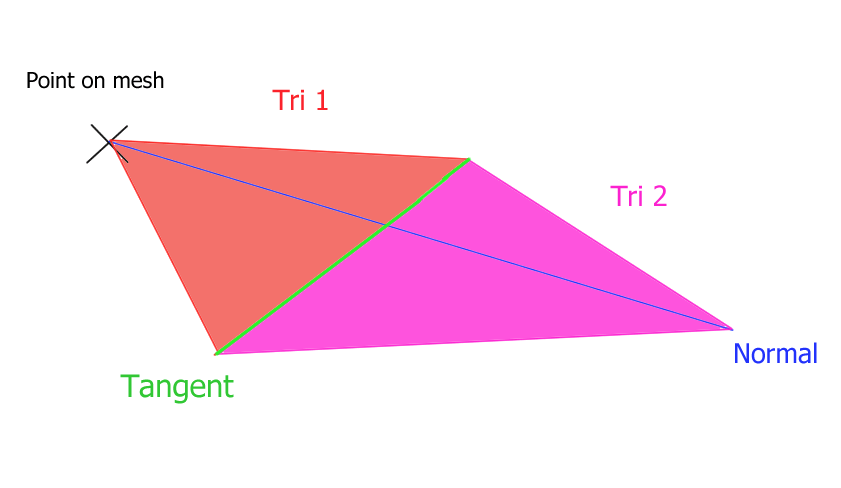
The next thing to think about was how I was going to get all the information I needed. As you can see the main two vectors I needed for the leaf is a normal facing away from the geometry, and a tangent vector to that normal along the y axis.
Each vertex has a normal so getting that is easy.
The hard part was finding a way to get the tangent. In the end I decided to use individual triangle vertex positions to calculate it. The alternative would be to calculate a transform using some sort of Quaternion rotation, which would require constructing a rotation matrix within the shader itself. (Which I looked into, but decided wasn’t necessary for this project)
Even using vertex positions presents some problems, due to the way Unity labels vertices in geometry.
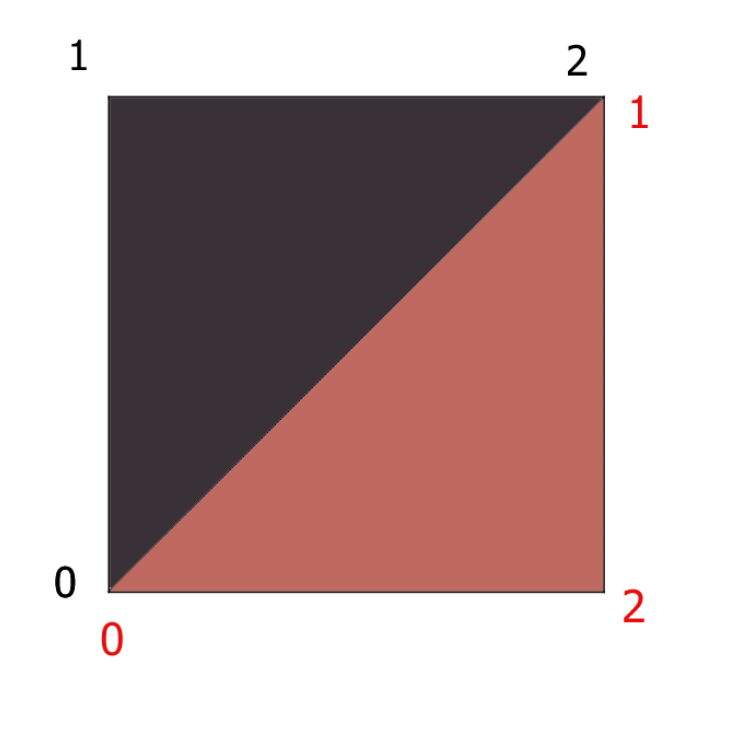
As you can see illustrated in the above diagram Unity’s convention is to label vertices on a triangle in ascending order, with the numbers increasing in a clockwise fashion when viewing the triangle from a position where it’s normal is pointing towards to camera.
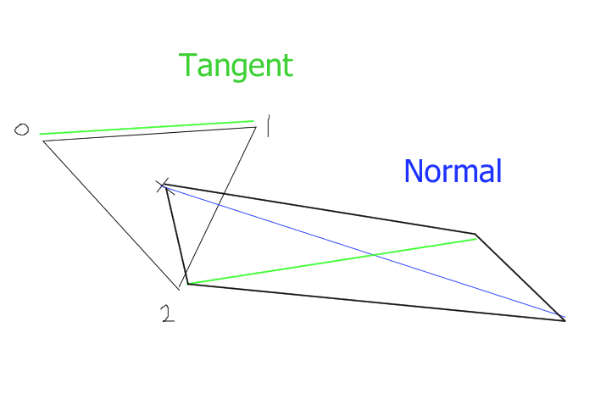
This means that while getting the vector between point 1 and 2 on one triangle gives us the tangent we want. On another it gives us a vertical tangent instead. I spent an evening trying to solve this problem by adding and taking away a combination of these vectors, but to no avail. I ended up just getting results like that shown below.

So instead I opted to not use a quads in my mesh for the leaves, and instead place a triangle in the correct orientation wherever I want a leaf. This means that each triangle will have the same tangent if I simply use (0->1) and orient the triangles so that this vector is a tangent to the vertical axis.
Implemented I was able to create a simple leaf shader.

The next stage was to add some animation. The GPU is bad to doing complex logic, so if you want a lot of “random values” for something like a wind animation it’s a good idea to sample a texture. You add the values you get from your sample to the positions of your vertices and then multiply the texture coordinated by time (which gets the time since the shader started running. ) Then kachow, you have got animation. (Show below)

Now you may notice that this shader is still not reacting to the lighting in the scene. This was the final hurdle for me to cross before the shader was game ready.
Essentially Unity handles most of this for you, and you just have to know the correct syntax to setup lighting. which I will explain more when walking through the actual shader code. Most of the work was just hours of me reading through Unity’s limited shader examples here as well as there #include libraries for lighting. Which are hosted on Github.
The final shader is below.
Shader "Geometry/Leaf10"
{
	Properties
	{
		_MainTex("Texture", 2D) = "white" {}
		_MainColour("Colour", Color) = (1,1,1,1)

		_Length("Leaf Length", float) = 1
		_LengthRandomness("Length Randomness (Additive)", Range(0.0, 2.0)) = 1.0

		_Width("Leaf Width", float) = 0.5
		_WidthRandomness("Width Randomness (Additive)", Range(0.0, 2.0)) = 1.0

		_AngleMod("Leaf Angle", float) = 0.5
		_AngleRandomness("Leaf Angle Randomness (Additive)", Range(0.0, 2.0)) = 1.0

		_LeafRotation("Random Rotation", Range(-100.0,100.0)) = 0.0
		_LeafCurveValue("Leaf Curve incriment", float) = -1.0

		_TextureSample("Texture", 2D) = "white" {}
		_TextureAmount("Texture amount", float) = 1.0
	}
		SubShader
		{

			CGINCLUDE

			#include "UnityCG.cginc"
			#include "Autolight.cginc"

			struct appdata
			{
				float4 vertex : POSITION;
				float2 uv : TEXCOORD0;
				float3 normal : NORMAL;
			};

			struct v2g
			{
				float4 vertex : SV_POSITION;
				float2 uv : TEXCOORD0;
				float3 normal : NORMAL;
			};

			struct g2f
			{
				float2 uv : TEXCOORD0;
				UNITY_FOG_COORDS(2)
				float4 vertex : SV_POSITION;
				float4 color : COLOR;
				float3 normal : NORMAL;
				unityShadowCoord4 _ShadowCoord : TEXCOORD1;
				float3 viewDir : TEXCOORD3;
			};

			//Inputted values

			sampler2D _MainTex;
			sampler2D _TextureSample;//Samples texture somehow...?

			float4 _TextureSample_ST;
			float4 _MainTex_ST;

			fixed4 _MainColour;

			float _Length;
			float _LengthRandomness;
			float _Width;
			float _WidthRandomness;
			float _AngleRandomness;
			float _AngleMod;
			float _LeafRotation;
			float _LeafCurveValue;
			float _TextureAmount;


			//Random num generator from https://halisavakis.com/my-take-on-shaders-grass-shader-part-i/
			float random(float2 st)
			{
				return frac(sin(dot(st.xy,
					float2(12.9898, 78.233)))*
					43758.5453123);
			}

			v2g vert(appdata v)
			{
				v2g o;
				o.vertex = v.vertex;
				o.uv = v.uv;
				o.normal = v.normal;
				return o;
			}

			g2f CreateVertex(float4 pos, float2 uv, float3 normal)
			{
				g2f o;
				o.vertex = UnityObjectToClipPos(pos);
				UNITY_TRANSFER_FOG(o, o.vertex);
				o.uv = uv;
				o.viewDir = WorldSpaceViewDir(pos);//view direction stuff
				o.color = _MainColour;
				o.normal = UnityObjectToWorldNormal(normal);
				o._ShadowCoord = ComputeScreenPos(o.vertex);
				#if UNITY_PASS_SHADOWCASTER //supposedly does something for shadows
				o.vertex = UnityApplyLinearShadowBias(o.vertex);
				#endif
				return o;
			}

			[maxvertexcount(6)]
			void geom(triangle v2g IN[3], inout TriangleStream<g2f> triStream)
			{
				g2f o;

				//Calculate the numbers we need.
				float Random1 = random(mul(unity_ObjectToWorld, IN[0].vertex).xz);// uses world space coordinates as seed.
				float Random2 = random(mul(unity_ObjectToWorld, IN[1].vertex).xz);
				float Random3 = random(mul(unity_ObjectToWorld, IN[2].vertex).xz);	//should probably generate less random numbers 😛
				float Random4 = random(mul(unity_ObjectToWorld, IN[2].vertex).yz);

				//Find leaf origin
				float4 barycenter = (IN[0].vertex + IN[1].vertex + IN[2].vertex) / 3;

				//Calculate normals and length
				float3 normal = (IN[0].normal + IN[1].normal + IN[2].normal) / 3;
				normal = normal * (1 + _LengthRandomness * Random1);
				normal = float3(normal.x, normal.y + (_AngleMod + _AngleRandomness * Random3), normal.z);//hacky leaf angle rotation

				//calculate tangent and width
				float4 tangent = IN[0].vertex - IN[2].vertex;
				tangent.y = (_LeafRotation * (Random1 + Random2 - Random3 - Random4) / 100);// flattens y for flat leaves
				tangent = normalize(tangent) / 2 * (_Width + (_WidthRandomness * Random2));

				//TextureSampling
				float2 SampledtextureValue = tex2Dlod(_TextureSample, float4(barycenter * _Time.y) * _TextureSample_ST);
				float4 wind = float4(SampledtextureValue.x, SampledtextureValue.y, 0, 0)* _TextureAmount / 100;

				//Leaf Curve
				float4 CurveIncriment = float4(0.0, _LeafCurveValue, 0.0, 0.0);


				float3 NormalOne = normalize(cross(barycenter + tangent + (float4(normal, 0) * _Length) + wind - barycenter, barycenter - tangent + (float4(normal, 0) * _Length) + wind - barycenter));
				float3 NormalTwo = normalize(cross(barycenter + tangent + (float4(normal, 0) * _Length) + wind - barycenter + (float4(normal, 0) * _Length * 2.5) + CurveIncriment + wind * 2, barycenter - tangent + (float4(normal, 0) * _Length) + wind - barycenter + (float4(normal, 0) * _Length * 2.5) + CurveIncriment + wind * 2));


				//Create and append Verts.
					//position
					//UV

				triStream.Append(CreateVertex(//base of leaf
					barycenter,
					TRANSFORM_TEX(IN[0].uv, _MainTex),
					NormalOne));

				triStream.Append(CreateVertex(//1st right
					barycenter + tangent + (float4(normal, 0) * _Length) + wind,
					TRANSFORM_TEX(IN[0].uv, _MainTex),
					NormalOne));

				triStream.Append(CreateVertex(//1st left
					barycenter - tangent + (float4(normal, 0) * _Length) + wind,
					TRANSFORM_TEX(IN[0].uv, _MainTex),
					NormalOne));

				triStream.Append(CreateVertex(//2nd right
					barycenter + tangent + (float4(normal, 0) * _Length) + wind,
					TRANSFORM_TEX(IN[0].uv, _MainTex),
					NormalTwo));

				triStream.Append(CreateVertex(//2nd left
					barycenter - tangent + (float4(normal, 0) * _Length) + wind,
					TRANSFORM_TEX(IN[0].uv, _MainTex),
					NormalTwo));

				triStream.Append(CreateVertex(//tip
					barycenter + (float4(normal, 0) * _Length * 2.5) + CurveIncriment + wind * 2,
					TRANSFORM_TEX(IN[0].uv, _MainTex),
					NormalTwo));

			}

			ENDCG


			Pass
			{

				Tags {"RenderType" = "Opaque" "LightMode" = "ForwardBase"}
				Cull Off
				CGPROGRAM
				#pragma vertex vert
				#pragma geometry geom
				#pragma fragment frag
				// make fog work
				#pragma multi_compile_fog
				#pragma multi_compile_fwdbase
				//#pragma shader_feature IS_LIT

				#include "Lighting.cginc"

				fixed4 frag(g2f i,  fixed facing : VFACE) : SV_Target
				{
				// sample the texture
				fixed4 col = tex2D(_MainTex, i.uv) * i.color;
				i.normal *= facing < 0 ? -1 : 1;
				float light = saturate(dot(normalize(_WorldSpaceLightPos0), i.normal)) * 0.5 + 0.5;
				float shadow = SHADOW_ATTENUATION(i);

				//shadow = facing < 0 ? light : shadow;
				col *= light * shadow + float4(ShadeSH9(float4(i.normal, 1)), 1);
				// apply fog
				UNITY_APPLY_FOG(i.fogCoord, col);
				return col;
			}

			ENDCG
		}

		Pass
		{
			Tags {"LightMode" = "ShadowCaster"}
			Cull Off


			CGPROGRAM

			#pragma vertex vert
			#pragma geometry geom
			#pragma fragment fragShadow

			#pragma target 4.6
			#pragma multi_compile_shadowcaster

			float4 fragShadow(g2f i) : SV_Target
			{
				SHADOW_CASTER_FRAGMENT(i)
			}

			ENDCG


		}
		}
}
So, now that you have read through that. let me break it down for you a little.
Starting with the properties. These are just shaderlab syntax properties, these show up in the inspector when interacting with a material using this shader. they allow user input.
The top line defines where in the shader list (when selecting a shader to use from a material) this shader is stored.
Shader "Geometry/Leaf10"
{
	Properties
	{
		_MainTex("Texture", 2D) = "white" {}
		_MainColour("Colour", Color) = (1,1,1,1)

		_Length("Leaf Length", float) = 1
		_LengthRandomness("Length Randomness (Additive)", Range(0.0, 2.0)) = 1.0//Use sine to add on degrees of randomness?

		_Width("Leaf Width", float) = 0.5
		_WidthRandomness("Width Randomness (Additive)", Range(0.0, 2.0)) = 1.0

		_AngleMod("Leaf Angle", float) = 0.5
		_AngleRandomness("Leaf Angle Randomness (Additive)", Range(0.0, 2.0)) = 1.0

		_LeafRotation("Random Rotation", Range(-100.0,100.0)) = 0.0
		_LeafCurveValue("Leaf Curve incriment", float) = -1.0

		_TextureSample("Texture", 2D) = "white" {}
		_TextureAmount("Texture amount", float) = 1.0
	}
Ct the start of the next block we import two CGinclude libraries. One is for basic surface shader stuff. The other contains a load of lighting stuff we need, mainly shadow functions and datatypes.
Here I define my structs appdata is passed to the vertex sub-shader, and v2g is passed form the vertex to the geometry sub-shader. (you may notice that these structs are identical and yes we could use the same one for a minor optimization. But this shader was adapted form harry’s grass shader and this is how he left them, and to be honest I forgot about this until writing this post. )
The semantics used in the structures are pretty self explanatory. NORMAL is the verts normal, POSITION is position, and TEXCOORDX is a texture. when using TEXCOORD you update the number on the end to change which map slot is used. Each texture can have 6 seperate maps (don’t quote me on that read the HLSL documentation linked last post)
The g2f struct, you guessed it passes data form the geometry to the fragment sub-shader. here we grab a few extra things such as shadow coordinates, the view direction and we also pass some fog data in the 2nd map slot. (Fog takes up one of your 6 texture slots)
The unityShadowCoord4 type is defined two layers deep in the ‘Autolight.cginc’ and then another CGinclude inside that file.
SubShader
		{

			CGINCLUDE

			#include "UnityCG.cginc"
			#include "Autolight.cginc"

			struct appdata
			{
				float4 vertex : POSITION;
				float2 uv : TEXCOORD0;
				float3 normal : NORMAL;
			};

			struct v2g
			{
				float4 vertex : SV_POSITION;
				float2 uv : TEXCOORD0;
				float3 normal : NORMAL;
			};

			struct g2f
			{
				float2 uv : TEXCOORD0;
				UNITY_FOG_COORDS(2)
				float4 vertex : SV_POSITION;
				float4 color : COLOR;
				float3 normal : NORMAL;
				unityShadowCoord4 _ShadowCoord : TEXCOORD1;
				float3 viewDir : TEXCOORD3;
			};
All these are simply re-declaring all our properties in CG/HLSL so we can actually use them in our sub-shaders.
sampler2D _MainTex;
			sampler2D _TextureSample;//Samples texture somehow...?

			float4 _TextureSample_ST;
			float4 _MainTex_ST;

			fixed4 _MainColour;

			float _Length;
			float _LengthRandomness;
			float _Width;
			float _WidthRandomness;
			float _AngleRandomness;
			float _AngleMod;
			float _LeafRotation;
			float _LeafCurveValue;
			float _TextureAmount;
A random number generator function, straight out of Harry’s blog. I take no credit.
//Random num generator from https://halisavakis.com/my-take-on-shaders-grass-shader-part-i/
			float random(float2 st)
			{
				return frac(sin(dot(st.xy,
					float2(12.9898, 78.233)))*
					43758.5453123);
			}
Simple vertex shader. just gets out vertex uv’s and normals.
v2g vert(appdata v)
			{
				v2g o;
				o.vertex = v.vertex;
				o.uv = v.uv;
				o.normal = v.normal;
				return o;
			}
At first glance this may look like the geometry shader, do not be fooled! This is just a helper function for the actual geometry function which is below. All this code has to be run for each vertex we want to add, so it makes sense to put in in a function to speed things up.
g2f CreateVertex(float4 pos, float2 uv, float3 normal)
			{
				g2f o;
				o.vertex = UnityObjectToClipPos(pos);
				UNITY_TRANSFER_FOG(o, o.vertex);
				o.uv = uv;
				o.viewDir = WorldSpaceViewDir(pos);//view direction stuff
				o.color = _MainColour;
				o.normal = UnityObjectToWorldNormal(normal);
				o._ShadowCoord = ComputeScreenPos(o.vertex);
				#if UNITY_PASS_SHADOWCASTER //supposedly does something for shadows
				o.vertex = UnityApplyLinearShadowBias(o.vertex);
				#endif
				return o;
			}
Next is our actual geometry shader. This is where the bulk of the work for this shader is done.
Working through it we start with a max vertex count, which we update to set how many vertices we want to create for each triangle(or whatever we choose to take as input for the geometry shader).
next is the geometry shader decleration. Unlike other subshaders it does not return a struct, But instead pushes any triangles made the Triangle stream. This shader is setup to take triangles as an input. But if we changed the initial parameters to ‘vertex v2g IN[1]’ we would instead run this shader for each vertex. Which can be useful to understand for future shaders.
onto the first line of the shader, we instantiate a new g2f struct, ready to be incrimented to the triangle stream.
Next we calculate some random numbers we need using our function we declared earlier.
Next we do a load of math to find all the different vectors and numbers we need.
We calculate the center (barycenter) of each triangle. And then calculate the normal ina similar fashion (Adding everything together and dividing by 3).
We multiply the normal by the random value to allow the designer some random leaf length controls. Then we add the leaf angle to the normal y value to allow us to control the angle of the leaves in the inspector.
We calculate the tangent as I discussed above by finding the vector between the two points. We then set the y values to allow for a hacked leaf rotation functionality. We add all our random variables together instead of generating a new one for efficiency, and because the rotation random here doesn’t matter too much.
Next we sample the texture values for the wind texture, based on our barycenter’s world location. We store this in wind for later. By using _Time.y (another inbuilt variable) in our offset we can scroll the texture as time passes and thus create the animation for the wind.
We get the curve increment and save that for later, this values is later added to the center of our leaf to make it curve downwards or upwards.
We do a large vector calculation using the cross function from CG to find the normal for our new faces. and then we run our helper g2f functions 6 times with the parameters to create the vertexes for the two triangles we want to make.
Ourur first vertex is simply at our barycenter coordinate.
Our second third fourth and fifth. Simpy add + or – the tangent and + the normal to their position, and then times this by length to allow us to adjust the leaf length in the inspector. We add one lot of wind to these leaves.
The final point we calculate by adding 2.5 * the length to it’s normal meaning the thickest part of the leaf will be about 2/5th’s along its length, and then add a curve increment + our wind times 2. This makes the leaves curl up or down, and makes the tip of the leaf blow more in the wind than the rest.
[maxvertexcount(6)]
			void geom(triangle v2g IN[3], inout TriangleStream<g2f> triStream)
			{
				g2f o;

				//Calculate the numbers we need.
				float Random1 = random(mul(unity_ObjectToWorld, IN[0].vertex).xz);// uses world space coordinates as seed.
				float Random2 = random(mul(unity_ObjectToWorld, IN[1].vertex).xz);
				float Random3 = random(mul(unity_ObjectToWorld, IN[2].vertex).xz);	//should probably generate less random numbers :P
				float Random4 = random(mul(unity_ObjectToWorld, IN[2].vertex).yz);

				//Find leaf origin
				float4 barycenter = (IN[0].vertex + IN[1].vertex + IN[2].vertex) / 3;

				//Calculate normals and length
				float3 normal = (IN[0].normal + IN[1].normal + IN[2].normal) / 3;
				normal = normal * (1 + _LengthRandomness * Random1);
				normal = float3(normal.x, normal.y + (_AngleMod + _AngleRandomness * Random3), normal.z);//hacky leaf angle rotation

				//calculate tangent and width
				float4 tangent = IN[0].vertex - IN[2].vertex;
				tangent.y = (_LeafRotation * (Random1 + Random2 - Random3 - Random4) / 100);// flattens y for flat leaves
				tangent = normalize(tangent) / 2 * (_Width + (_WidthRandomness * Random2));

				//TextureSampling
				float2 SampledtextureValue = tex2Dlod(_TextureSample, float4(barycenter * _Time.y) * _TextureSample_ST);
				float4 wind = float4(SampledtextureValue.x, SampledtextureValue.y, 0, 0)* _TextureAmount / 100;

				//Leaf Curve
				float4 CurveIncriment = float4(0.0, _LeafCurveValue, 0.0, 0.0);


				float3 NormalOne = normalize(cross(barycenter + tangent + (float4(normal, 0) * _Length) + wind - barycenter, barycenter - tangent + (float4(normal, 0) * _Length) + wind - barycenter));
				float3 NormalTwo = normalize(cross(barycenter + tangent + (float4(normal, 0) * _Length) + wind - barycenter + (float4(normal, 0) * _Length * 2.5) + CurveIncriment + wind * 2, barycenter - tangent + (float4(normal, 0) * _Length) + wind - barycenter + (float4(normal, 0) * _Length * 2.5) + CurveIncriment + wind * 2));


				//Create and append Verts.
					//position
					//UV

				triStream.Append(CreateVertex(//base of leaf
					barycenter,
					TRANSFORM_TEX(IN[0].uv, _MainTex),
					NormalOne));

				triStream.Append(CreateVertex(//1st right
					barycenter + tangent + (float4(normal, 0) * _Length) + wind,
					TRANSFORM_TEX(IN[0].uv, _MainTex),
					NormalOne));

				triStream.Append(CreateVertex(//1st left
					barycenter - tangent + (float4(normal, 0) * _Length) + wind,
					TRANSFORM_TEX(IN[0].uv, _MainTex),
					NormalOne));

				triStream.Append(CreateVertex(//2nd right
					barycenter + tangent + (float4(normal, 0) * _Length) + wind,
					TRANSFORM_TEX(IN[0].uv, _MainTex),
					NormalTwo));

				triStream.Append(CreateVertex(//2nd left
					barycenter - tangent + (float4(normal, 0) * _Length) + wind,
					TRANSFORM_TEX(IN[0].uv, _MainTex),
					NormalTwo));

				triStream.Append(CreateVertex(//tip
					barycenter + (float4(normal, 0) * _Length * 2.5) + CurveIncriment + wind * 2,
					TRANSFORM_TEX(IN[0].uv, _MainTex),
					NormalTwo));

			}

			ENDCG
Our first pass.
This is the lighting pass, and does most of the work we want. We turn of culling to render the backfaces of the leaves so they aren’t invisible from below . Using #pragma we define all the different sub-shaders we want to use for this pass, and we pass in our sub-shaders from above. We also pass some fog information which just makes the fog work, unity handles all the fog stuff for us.
The CGinclude ‘Lighting’ use referenced to get us the shadow functions/data we need.
Next is our fragment shader definition. This is defined here because we have a different fragment shader in our next pass.
I have used the VFACE semantic in this shader to allow better backface lighting. What VFACE does is return a value between -1 and 1 depending on which was the face is facing in relation to the camera. -1 facing away, 1 facing towards the camera.
A breakdown of what the sub-shader does follows.
Samples the colour of the texture on the pixel we are currently shading. Stores this in col.
to prepare before the lighting is added to the raw colour, we flip the normal of the face is the face is facing away from the camera (This corrects the lighting on back faces)
We then get the scene lighting for that pixel using inbuilt functions from the Lighting.cginc.
We grab the shadow by passing our unityShadowCoord4 we defined in our geomerty shader helper function. into the inbuilt shadow function (SHADOW_ATTENUATION) provided by our cginc files. This gets us how shaded the current pixel is.
Finally we times the colour by our lighting and shadow, and the scene ambient lighting fetched by ShadeSH9().
And apply fog.
The pixel colour is now correct and is returned with return col;
Pass
			{

				Tags {"RenderType" = "Opaque" "LightMode" = "ForwardBase"}
				Cull Off
				CGPROGRAM
				#pragma vertex vert
				#pragma geometry geom
				#pragma fragment frag
				// make fog work
				#pragma multi_compile_fog
				#pragma multi_compile_fwdbase
				//#pragma shader_feature IS_LIT

				#include "Lighting.cginc"

				fixed4 frag(g2f i,  fixed facing : VFACE) : SV_Target
				{
				// sample the texture
				fixed4 col = tex2D(_MainTex, i.uv) * i.color;
				i.normal *= facing < 0 ? -1 : 1;
				float light = saturate(dot(normalize(_WorldSpaceLightPos0), i.normal)) * 0.5 + 0.5;
				float shadow = SHADOW_ATTENUATION(i);

				//shadow = facing < 0 ? light : shadow;
				col *= light * shadow + float4(ShadeSH9(float4(i.normal, 1)), 1);
				// apply fog
				UNITY_APPLY_FOG(i.fogCoord, col);
				return col;
			}
The final pass is just for casting shadows. This is all powered by the one function SHADOW_CASTER_FRAGMENT() in our new fragment sub-shader named fragShadow. You can see we define this as our fragment shader in this pass’s #pragma.
We also have to setup a tag to tell Shaderlab we want to render shadows.
Pass
		{
			Tags {"LightMode" = "ShadowCaster"}
			Cull Off


			CGPROGRAM

			#pragma vertex vert
			#pragma geometry geom
			#pragma fragment fragShadow

			#pragma target 4.6
			#pragma multi_compile_shadowcaster

			float4 fragShadow(g2f i) : SV_Target
			{
				SHADOW_CASTER_FRAGMENT(i)
			}

			ENDCG


		}
Wonderfull! all done. I hope this helped you understand a bit of what is going on in this shader. I tried to explain it all clearly but to be honest shaders are hard, and there is a lack of good resources about them. Maybe this post can help some people in future.
I will leave you with a giff of the shader working in Unity.


 ArtInTheOcean